No further information available.



Home » Product Range » Vibration analysis, bearing diagnostics, machine protection » Vibration analysis machine diagnostic software » VMI SpectraPro Vibration Analysis Software
Vibration diagnostic software for VMI spectrum analyzers
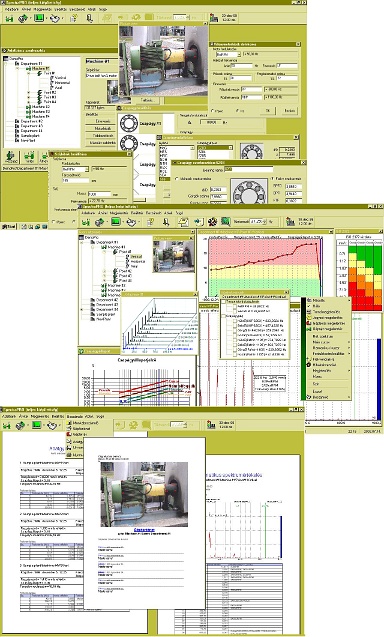
VMI SpectraPro Vibration Analysis Software - The SpectraPro is an easy-to-use, Hungarian-language, Windows XP / Vista / Windows7 / Windows10-based data storage and evaluation vibration diagnostic PC software for VMI EasyBalancer, EasyViber, X-Viber, X-ViberPro, and Viber-X5 handheld instruments.
With the SpectraPro program, new databases can be easily created by copying and editing sample machines and machine groups. Measurement paths serving data collection can be created with almost a single button press. For easier navigation, machine diagrams or actual photos can be inserted into the database as graphic files. The SpectraPro can interpret up to four different bearings at a single measuring point. The bearing database supplied with the software contains the fault frequencies of over 5000 bearings commonly used in Europe. If a manufacturer or special bearing type is not included in the database, based on the known geometrical dimensions, the program instantly calculates the associated fault frequencies, thus the bearing database can be expanded limitlessly and quickly.
Among the vibration analysis functions of SpectraPro are the simultaneous display and comparison of multiple spectrums, time signals, trends, waterfall plots, run-up/shutdown tests, phase/amplitude curves, and other graphs. With the SpectraPro diagnostic program, the evaluation of vibration spectra and time signals is supported by single or multiple cursors, and several services are available for further evaluations, the menu list of which can be accessed by right-clicking. For time-saving purposes, the most commonly used functions can also be found on the top icon bar in a user-editable manner.
In the SpectraPro program, spectrums, time signals, trends, and maintenance notes can be activated simultaneously. By clicking on the data points of trends, you can access the assigned spectrums and other data.
For the evaluation of effective values, an auxiliary table prepared according to ISO2372 provides assistance, and for the evaluation of bearing condition indicators, an experiential bearing condition diagram that can be accessed with a button press provides support. User-defined limit values (during database editing) are also displayed: the data in the database structure, as well as the measurements in the trends, and the colors of the trend backgrounds change according to the set limit values - thus, critical measuring points or times are immediately noticeable at a glance.
Using the fault frequency menu window, various origin fault frequencies and their multiples, as well as sideband modulations, can be drawn as lines in the spectrum. The SpectraPro offers this service, for example, for the recognition of belt drive, gear, and electric motor faults, as well as bearing faults. Further evaluation assistance is provided by the "frequency list" function, which lists all peaks in the spectrum (sorted by magnitude) along with a likely diagnosis based on the data.
The SpectraPro diagnostic program also provides efficient assistance for documentation by creating automatic reports. For example, the "Spectrum Report" documents the current spectrum - numerically in the form of the aforementioned frequency list and graphically with the spectrum plot. If only a short - summary - report is needed, the "data collection report" automatically lists the results of the latest data collection, highlighting limit exceedances and the largest peaks along with their likely explanations. The reports can be printed at any time or exported for editing in Word. All sample templates of automatic reports in SpectraPro are in Hungarian!
System Requirements:
| Hardware: | |
| CPU | Pentium (recommended: 200MHz or faster) |
| HDD | 500MB or more (recommended: min. 200 MB free capacity) |
| RAM | 32Mbyte or more (recommended: min 64 MB) |
| Graphics | 1024 x 768, 256 colors or more |
| Operating System: | WindowsNT, Windows XP, Windows Vista, Windows 7, Windows 10 |
| Communication port: | A free serial interface is required for connecting the MultiViber, the EasyBalancer, or the EasyViber, and a free USB port for the X-Viber or Viber-X5 handheld instruments. |
No further information available.
No downloadable files available.
Copyright © PIM Professzionális Ipari Méréstechnika Kft.
2026 | Minden jog fenntartva
Impresszum | Adatkezelés
Home » Product Range » Vibration analysis, bearing diagnostics, machine protection » Vibration analysis machine diagnostic software » VMI SpectraPro Vibration Analysis Software